
 |
News |  |
Tutorials | |
Projects | |
Reviews | |
Authors | |
Contact | |
Search | |
Links |  |
|
Admin | |

RA2 Buildings - Aviation Research : Buildup Animation
The buildup animation is important because it looks better then just the building 'apearing' from no where, and it also allows for the building to be sold after construction.
Using 3DSMax to create the buildup animation, the building will rise up out of the ground too its full height. This is the simplest, and quite effective way to do things.
Save your existing model as a new file. Buildup animations tend to have MK suffixed, eg. GAPOWR for allied power plant, GAPOWRMK for the buildup animation.
For the Soviet Aviation facility, three groups were made.
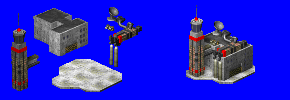
Switching auto-keyframing on, and moving to frame 19 (20 frame animation) make a key-frame for the 'final' positioning of the groups.
At frame 0, create another key-frame for the start position of all the groups, this would be below the ground level.
Inbetween, the groups were staggered, and paused, to add a more dynamic effect, as apposed to just floating straight up out of the ground (which does work just as well).
Files were rendered, from 0 to 19. Saved as PNG, and used a sharp anti-aliasing.
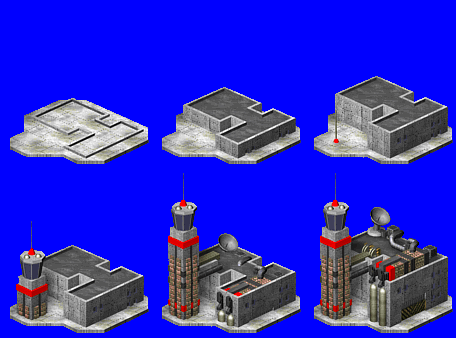 The rendered files then need to be cleaned up, like for the main image. I removed the blue outline. If you don't want to clean all the house colours for all 20 frames, change the red colour to grey. This is what they did for the original Command and Conquer, and other complex buildings.
For your benefit, the image was put together in Animation shop as a GIF so you can see what it looks like.
Once you've done all that, well done. That covers all the difficult parts of creating RA2 buildings. From here, you need to convert them into SHP format for use ingame.
Note: Here I would like to point out that the camera angle has been incorrectly set and the building has been rendered a way bit too big for ingame. Thus, it needs recalculating. See Appendix 1 at the end of this project.
Author: Markavian
Last edited on: 18th Dec, 12:53 pm
Please
rate this article.

project Pages
Building Template
Start with a sketch
3D Modelling
Standard SHP
Buildup Animation
File Coversion
Apendix 1
