
 |
News |  |
Tutorials | |
Projects | |
Reviews | |
Authors | |
Contact | |
Search | |
Links |  |
|
Admin | |

RA2 Buildings - Aviation Research : 3D Modelling
Modelling and Texturing
This is the bit I dread the most, building a decent looking building. As I see it, the whole concept of 3D modelling is to use basic shapes, such as Boxes, Cylinders, Spheres.. and make them look like something.. make them look real. Using various point deformations, and boolean interactions you can create new complex shapes.Texturing also plays a key part in realism. The quality of RA2 buildings is much higher then previous C&C games. The textures you use must match the existing ingame buildings. Importantly the colour must match since we are working on a limited palette.
Although the buildings are unrealistic in sense of scale and functoin, they have an almost comical nature about them. Each building must define its purpose. Use large characteristic features, but remember to cover all the bland areas with fine details, crates, power couplings, vents, oil tanks, pistons, drains, pipe work, spare bricks, missile casings, ladders, fences.. anything and everything to breath life and a sense of realism to your building.
Sense of scale
The diagram below attemps to show the scale that the template works to. One large square represents one tile in RA2. Onscreen this will be 60 px wide by 30 px high. The diagram shows two building bases 2x2 and 3x3.

Note: For larger base sizes where you need to adjust the camera position/zoom see 'Appendix: 1' (Setting the correct render size).
Finished Model
Here are two variations of my aviation research facility. The one on the right is the more recent and one I'll be using for the rest of the stages.
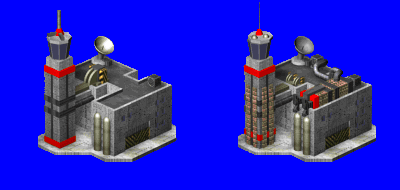
You can spot most of the basic shapes I've used, spheres, boxes, capsules. The main concrete building was actually made by drawing a point-to-point spline and extruding it. I then used various boolean functions to add windows, a roof top, and the vehicle door. The control tower room is infact an eight sided Cone, with no smoothing.
Note: My texture library is far more extensive then the textures provided in the template. Find your self some decent images if you want better looking buildings.
From this stage, its time to create the SHP, which requires a little pre-conversion picture pixel editing in Paint Shop Pro.
Author: Markavian
Last edited on: 18th Dec, 12:53 pm
Please
rate this article.
« Prev page 'Start with a sketch' « » Next Page 'Standard SHP' »

project Pages
Building Template
Start with a sketch
3D Modelling
Standard SHP
Buildup Animation
File Coversion
Apendix 1
