
 |
News |  |
Tutorials | |
Projects | |
Reviews | |
Authors | |
Contact | |
Search | |
Links |  |
|
Admin | |

RA2 Buildings - Aviation Research : Building Template
The first important step in making the new building is creating the artwork that will be used for the SHP. Importantly alot of how you make your SHP will affect how its displayed ingame. Set the foundations correctly, and you'll take out alot of the pain involved later on.
Template
I have developed a useful template (for 3D Studio Max 5 only) which you can use to get you started building.You can download the template here: isometric_template.zip (21 kb)
Important Features
I.e. things you shouldn't change:- The camera position has been accurately placed for a perfect isometric angle.
- The back corner of the base tile (XYZ 100, 100, 0) is centered to the image.
- Contains basic textures and colours to get your building started.
When you open up the template, you should see something like this:
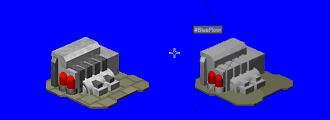
(Hit F9 to render). You shouldn't get any errors about missing files, I avoided using images so you shouldn't have this problem.
The building there is just an example, delete that, or at elast strip it down to the base to get yourself going.
Important Note: The XYZ position 100, 100, 0 is the back corner of the base tile. It is incredibly important that the back corner of your building is on this point. This point is infact DEAD CENTER of the rendered image. Don't believe me?:
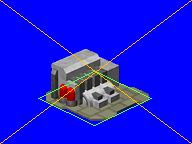
What this image attempts to show, is that the middle of the image is where the two yellow lines cross. A virtual outline of the tile base is represented by the green line. The back corner of the green tile sits on the center of the image.
Whys this important? Red Alert 2 positions buildings by the back-edge of top tile. It uses the center point as its base for working out the isometric ingame height. Kinda quite clever, its a shame no one from WW ever told me that. Thanks to some forum somewhere for pointing this out to me.
Author: Markavian
Last edited on: 18th Dec, 12:53 pm
Please
rate this article.
« Prev page 'Overview' « » Next Page 'Start with a sketch' »

project Pages
Building Template
Start with a sketch
3D Modelling
Standard SHP
Buildup Animation
File Coversion
Apendix 1
