
 |
News |  |
Tutorials | |
Projects | |
Reviews | |
Authors | |
Contact | |
Search | |
Links |  |
|
Admin | |

Playing Multiplayer Games via VPN : Connecting to a VPN
- Go to the Control Panel and click on Network Connections. Click "Create a new connection."
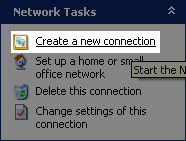
- Click Next. Then select "Connect to network at my workplace."

- Make sure it's a "Virtual Private Network connection."

- Enter anything for the company name.

- Since you need to be connected to the Internet before you can connect to a VPN you may choose to have Windows automatically connect to the Internet if you are not already connected. This is optional.

- Now enter the IP address of the host computer to finish the process. The person that is hosting the VPN should give this to you.

- Now go back to Network Connections and double click the connection you just created. Enter the username and password that the host of the VPN should have given you.
- Once you connect to the VPN you can play any game with other people on the VPN as if it were a LAN game.
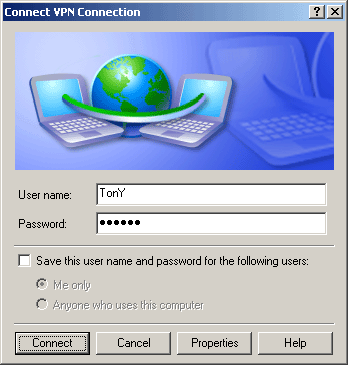
Important: Once you connect you will not be able to use the Internet. You should agree beforehand what you are planning to do or use a program like Simple Chat to chat with the other people on the network.
Author: Markavian
Last edited on: 28th Apr, 7:22 am
Please
rate this article.
« Prev page 'Creating a VPN' « » Next Page 'Troubleshooting' »

tutorial Pages
