
 |
News |  |
Tutorials | |
Projects | |
Reviews | |
Authors | |
Contact | |
Search | |
Links |  |
|
Admin | |

C&C Generals : World Building : Sculpting Tools
Fore-thoughts
About now you should have a blank map with a large expanse of water. I tend to delete the large area of water, it bugs me. You can leave it there if you want.NOTE: Remember to save REGUALLY. As soon as you get a little inkling that you need to save, hit Ctrl+S immediately. You never know when the program might crash, so keep saving.
Tools
Quickly, an introduction to the first few tools you'll need to use.
Height Brush
 The most important/useful tool in my opinion. Set the height of brush you want to paint at, and drag around the landscape. This is great for creating flat areas of land for bases and roads at different height levels. Its also very useful for making 'walls' and trenches in conjunction with the Ramp tool.
You can also set the heigh brush to a level lower then a plateau and 'dig' channels through it.
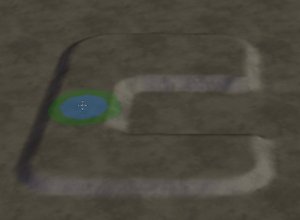
Creating a flat mount using the height brush.
Mound Tool
 This tool is great for building mountains and other small hills. Its very natural. In my opinion it takes the 'wetsand' approach to landscape design. The mound tool continually adds height onto the area below it at the rate defined in the options panel, much the same as dribbling wet sand ontop of sand. This is great later for building terrain features that look like they've been carefully sculpted.
In the screenshot below, see how I quickly made a mini mountain range. Altho this looks really pretty its hard for tanks to get around. This would look better at the edge of a map where you could drive round it, and go 'Ooh, thats pretty'.
Dig Tool
 Similarly the dig tool does the same as the mound tool, but in the opposite direction. I haven't really found much use for it. Maybe it'd be good if you stared with a high map, and dug away to reveal rivlets and stuff.. kinda upside down mountain bulges.
You might find it useful for digging channels. You can only lower the map to a certain point, past which it just flattens out. I prefer to use the Heightbrush set down to zero height for this because it produces a smoother cut.
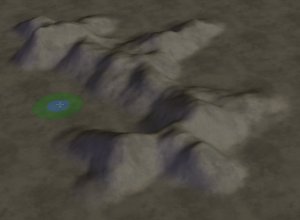
Natural mountains and hills using the mound and dig tools.
Ramp Tool
 The ramp tool is great for connecting two levels together. Basically it creates a piece of flat/sloped land directly between two points at the same height or different levels.
You can use it for creating entrances to bases across slopes, digging trenches, or making walls. In the example below, two mounds were made using the Height Brush tool, then a wall was formed between them using the ramp tool.
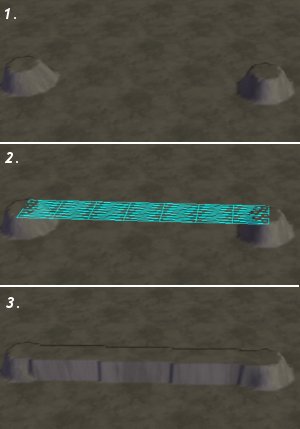
Use the ramp tool for creating walls, and connecting different levels together.
Author: Markavian
Last edited on: 16th Jun, 8:29 pm
Please
rate this article.

tutorial Pages
