
 |
News |  |
Tutorials | |
Projects | |
Reviews | |
Authors | |
Contact | |
Search | |
Links |  |
|
Admin | |

Mini-iTX EPIA 800 : The Board
Overview
Not just a mother board, its got half a computer already intergrated, and its small enough to fit in your glove box.First off, heres a pic:
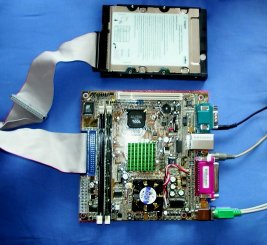
You have to notice its small. Very small. Its not tiny, but its definitely small. Compared the massive beast of a machine that lies bulkily next to my desk the mini-iTX is very small. Which is a good thing.
Infact the size is the important thing about this board. Many computer cases available today are bloated in size. People don't realise how much space they take up! When you see the mini-iTX, you being to realise exactly how small it is, so much processing power in such a small space.
The processor may only be 800MHz but thats way plenty for modern basic applciations (not a games machine really). Already I've started filling my HDD up with music files, and word/excel/access run fine on it.
The size and quietness make it an excellent portable PC, and definitely a create replacement for dektop PCs. It has integrated peripherals such as sound, basic 3D graphics, network and USB connectors which make it very good value for money.
Features
Favourable onboard features:For full technical specifications on mini-iTX boards, go see the official VIA Technologies website
Noteable features:
There are other versions of the mini-iTX that have slightly different specifications.
Potholes to look out for:
Building the computer
Extra things I needed when building my EPIA 800 into a full computer:You'll need to power the board, a HDD and CD-Drive, so pick a small power supply, but make sure its got enough connectors to power all your drives.
Personal Problems
Power supply
My power supply isn't powerful enough to support a full sized CD-Drive and my HDD. Instead I piggy backed off another machine to install Windows XP off a CD. Now everything runs through a network connection... and I don't actually need the CD drive.
Networking
I've never used RJ-45 connectors for my network before. It turns out standard RJ-45 wire is only good for connecting to a network hub. If you want to directly connect two PCs with RJ-45 you need to use a special crossover cable (which has some of the internal wiring crossed).Once I'd got the new cable, and plugged it into both machines the network ran straight away.
TV Output
Problem: Grey TV output.Solution: Went into BIOS switched TV mode from NTCS to PAL.
Problem: In windows, refresh rate was badly wrong, couldn't see mouse well enough to do jack.
Solution: Connect up to standard monitor. Install VIA drivers off CD.
Next time round
Ok, so I had some headachey problems setting the board up. However, if you know what your doing its as easy as pie setting this thing up. Next time I'd easily be able to do the whole thing in a matter of hours.
Concluding words
Definitely a great board. A cheap, affordable piece of equipment. I picked mine up for under £90, and that saves having to buy a sound card, graphics card and network card.The size is great, I can wait to see how small a box I can cram it in to. I'll be sure to post pictures here on mkv25.net once I'm done. I'm thinking a diddy sprayed bright orange plastic box.
Installation of drivers (with Windows XP) is pretty much automatic. VIA have certainly produced an excellent piece of technology.
10/10
Links
Good places to go looking for more info about this great board.VIA Technologies: Mini-iTX - Official website of the mini-iTX
Mini-iTX.com - Home of Mini-iTX case mods.
Author: Markavian
Last edited on: 18th Jan, 7:15 pm
Please
rate this article.

review Pages
